Self-hosted websites
Add an inspection point in front of the sites and tools you publish. Keep certificates, routing, and security policy together as your application inventory grows.
Self-hosted web application firewall
An open-source web application firewall for the websites and APIs you run. Decide what reaches each application, understand why requests are blocked, and manage HTTPS from one dashboard. Hosted on your infrastructure.
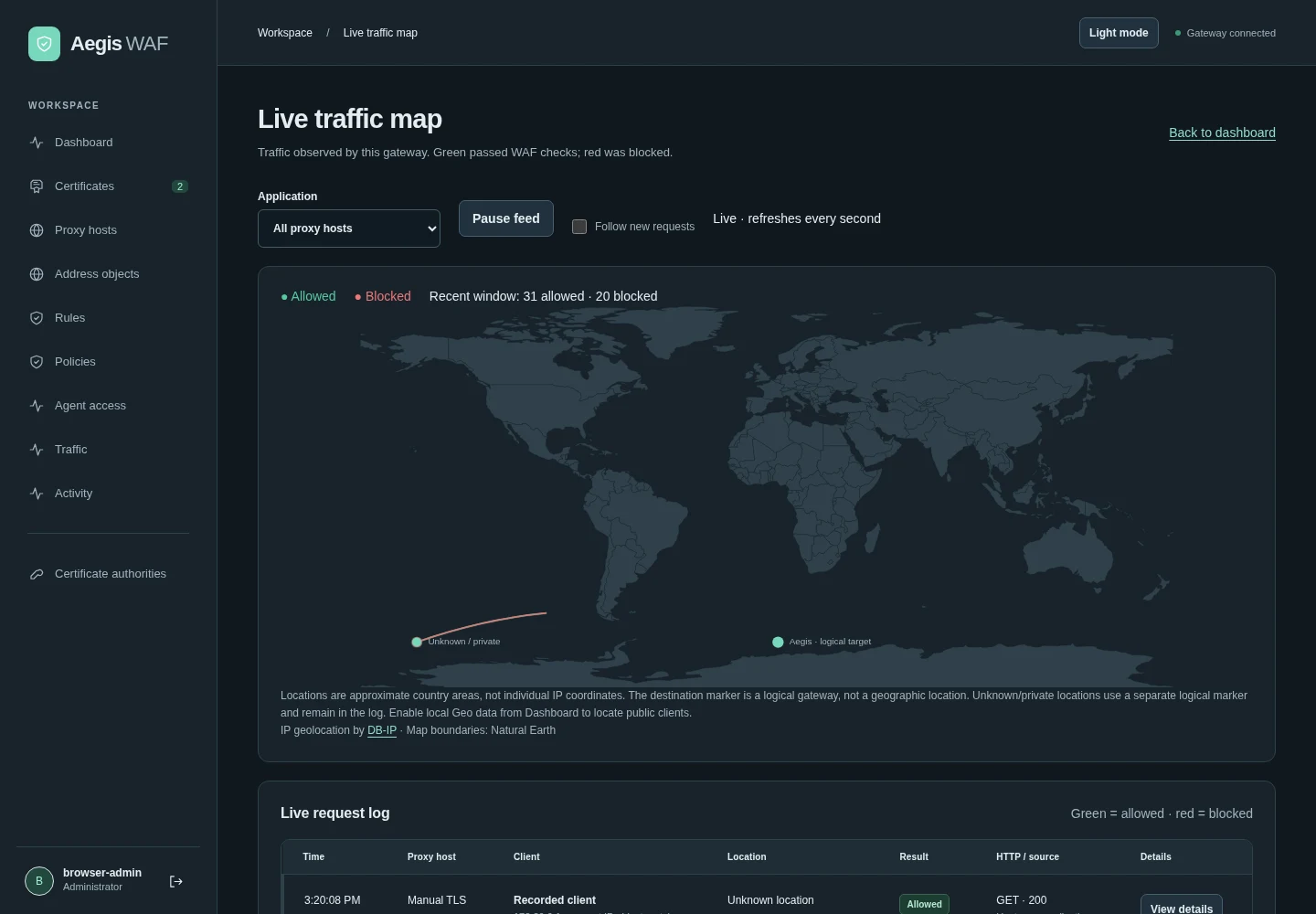
Follow recorded requests, distinguish allowed and blocked traffic, and investigate individual events.
Actual application screenshots from isolated test deployments, using example domains and synthetic data. Capture notes
Who Aegis WAF is for
When you operate the application, you need a way to understand and control the requests reaching it. Aegis WAF gives developers and IT teams a shared place to manage that work.
Add an inspection point in front of the sites and tools you publish. Keep certificates, routing, and security policy together as your application inventory grows.
Choose endpoint behavior that fits the client. API and SSE modes return JSON denials without browser CAPTCHA, while policies let you tune protection for each upstream.
Reuse protection policies across applications and investigate traffic from one workspace. Keep inspection on your infrastructure while retaining control of rules and deployment.
Inside your environment
Aegis WAF sits in front of your HTTP(S) applications. It terminates TLS, applies the protection you configure, and forwards accepted traffic to the appropriate upstream.

Separate management accessDashboard and API access stay apart from public application traffic.
A small default footprintAegis WAF and PostgreSQL. Redis/Dragonfly is optional for shared rate budgets.
Built for the work of running applications
A useful WAF helps you answer everyday questions: which rule matched, which application is affected, and what should change?
Your public website and your internal tools have different traffic patterns. Apply Coraza and OWASP Core Rule Set protection per application, with reusable policies and targeted exclusions.
Read the guideA blocked request needs an explanation. Review matched rules, start custom policies in Observe, and adjust detection sensitivity before deciding what to enforce.
Read the guideManage HTTPS where requests enter your environment. Automatic certificate issuance and renewal sit alongside upstream routing and application protection in the same dashboard.
Read the guideUse the live traffic view to spot activity, then investigate recorded requests and rule matches. Connect alerts and metrics to the monitoring workflow your team already uses.
Read the guideOptional MCP integration
Let your own agent investigate telemetry and prepare changes. Aegis WAF keeps access scoped and requires an offline impact simulation before live protection changes.
No built-in model. No inference dependency in the request path. You choose the external agent and its approval process.
Explore agent accessScoped access to permitted telemetry and operations.
Proposed rules begin as disabled drafts.
Test the exact change against evidence and test cases.
An explicitly permitted key and a fresh simulation receipt are required.
Find your fit
Evaluate Aegis WAF against traffic you understand. Choose a representative website or API, connect it in a test environment, and use a custom policy in Observe to review matches before enabling blocking.
The standard deployment uses Docker on Linux/amd64 with PostgreSQL. The repository has the current installation steps and operating requirements.
Install Aegis WAFCheck normal user journeys, API clients, and rule matches. Measure latency with the policies and inspection settings you intend to use. Published benchmarks provide a starting point for your evaluation.
Before you deploy
Aegis WAF is NextGridIT’s open-source web application firewall and reverse proxy for HTTP(S) applications. It brings application-specific security policies, TLS certificates, and traffic investigation into one self-hosted dashboard. Its source repository is nextgridit-team/Aegis-WAF on GitHub.
A reverse proxy routes incoming requests to your applications. Aegis WAF also checks requests against configured security policies using Coraza and OWASP Core Rule Set signatures. You decide which policies apply to each application and whether custom policies observe or block matching traffic.
Aegis WAF application code is available under the MIT license. You supply and operate the hosting infrastructure; dependencies retain their own licenses. NextGridIT can separately help you plan and configure a deployment.
Yes. Aegis WAF supports HTTP(S) upstreams with Website, API, and SSE/streaming endpoint modes. API and SSE modes use JSON denials without browser CAPTCHA. Inspection is bounded, and WebSocket frames and binary gRPC bodies are outside body-inspection coverage.
No. The firewall runs without an AI model. Optional MCP access lets an external agent investigate telemetry and prepare policy changes. Scoped permissions and an offline impact simulation are required before live protection changes.
Start with one representative application and test legitimate traffic, rule matches, and performance in your environment. The project is under active development; administrator MFA and automatic access/audit-log retention are not yet implemented. A WAF complements application updates and upstream network protection. Review the linked deployment guide, security model, and current limitations as part of your evaluation.
Try the open-source project on your own, or talk with NextGridIT about application fit, network placement, and policy tuning.
Questions or feature ideas? Open an issue on GitHub.